
Personal Branding for Job Seekers: CV, Color and Profile Photo
 Ezlun Team9 min read
Personal branding for job seekers is the consistent impression a recruiter forms of you from your CV, profile photo, LinkedIn and the way you introduce yourself. You do not need a logo or a following. You need every channel to say the same clear thing about you.
This guide covers four steps: define your message, choose a color, prepare a profile photo, and bring it all into your CV and LinkedIn. Each step has an Ezlun tool to speed it up.
What does personal branding mean when you are looking for a job?
It is the short answer to "who is this person and what are they good at" that a recruiter reaches after a few minutes with your profile. If your CV says you work in data, your LinkedIn is all travel posts and your photo is a holiday snap, that answer gets blurry.
A job seeker's personal brand has three layers:
Layer | What it includes | Example |
|---|---|---|
Message | Your role, strengths and the value you bring | "Product designer, strong in user research" |
Look | Profile photo, colors, fonts, CV layout | A clear face on a tidy background; one accent color on the CV |
Proof | Experience, projects, numbers, what others say about you | Case studies, measurable results, recommendations |
The message comes first. Color and photos make the message easier to remember. They never replace proof.
Step 1: Decide what you want to be remembered for
Aim to finish this sentence: "I am a [role] who is good at [one or two strengths], and I fit best in [type of work or environment]." It becomes the source for your CV summary, your LinkedIn headline and the way you introduce yourself in interviews.
Three questions help you write it:
What are the three things you did best recently, and what do people compliment you on?
Which skills come up most often in the job ads you want to apply to?
Do you prefer working alone, in a small team, or in a large organization with clear processes?
If you want to explore your personality tendencies, the article on MBTI and the 16 personality types for careers is a starting point. Treat the result as a prompt for reflection, not a fixed label.
Some people like to use Tarot Reading as a way to ask themselves questions, for example drawing one card and asking "what does this card make me think about my current job?" A tarot reading is for entertainment and reflection. It cannot tell you which career suits you, and it should not be the basis for choosing a job. The guide to tarot spreads for beginners explains how the different spreads work.
If you keep thinking "I'm not good enough to describe myself like that", the article on imposter syndrome and self-doubt at work can help you look at your skills more fairly.
Step 2: Choose personal brand colors
One main accent color, used the same way on your CV, portfolio and LinkedIn banner, makes your profile look intentional. You do not need many colors. One accent and one or two neutrals are enough.
With Ezlun's Color Palette Generator:
Enter a color you like, or one that feels close to your field, as the base color.
Choose a generation mode. For job applications, Monochromatic (one hue in several shades) or Analogous (neighboring colors on the color wheel) are usually safe and easy to read.
Copy the HEX code of your accent color, for example
#1e3a5f.Save the code. You will use it in step 4.
Color directions by the impression you want to give:
Impression | Color direction | Common fields |
|---|---|---|
Trustworthy, steady | Navy, deep blue | Finance, accounting, consulting, tech |
Calm, balanced | Deep green, dark teal | Healthcare, education, sustainability |
Creative, energetic | Terracotta, burnt orange, deep pink | Marketing, design, media |
Minimal, neutral | Charcoal, taupe | Most fields, when you are unsure |
These are common tendencies, not rules. What matters most is that text on your color stays easy to read. The guide on how to choose a color palette for a website explains contrast and how to pick primary and secondary colors.
Step 3: Take a professional profile photo
Your profile photo should show your face clearly, be well lit, have a tidy background and look like you today. You do not need a studio. A phone photo taken near a window is good enough.
How to do it:
Frame from the shoulders up, look straight at the camera, with light coming from the front. Wear what you would wear to an interview.
Open Ezlun's Remove Background and upload the photo. It is processed in your browser and not sent to a server.
Touch up the hair edges with the Erase or Restore brush if needed, then download the transparent PNG.
Place the cutout on a plain background, for example a light shade from your step 2 palette, so it matches your CV.
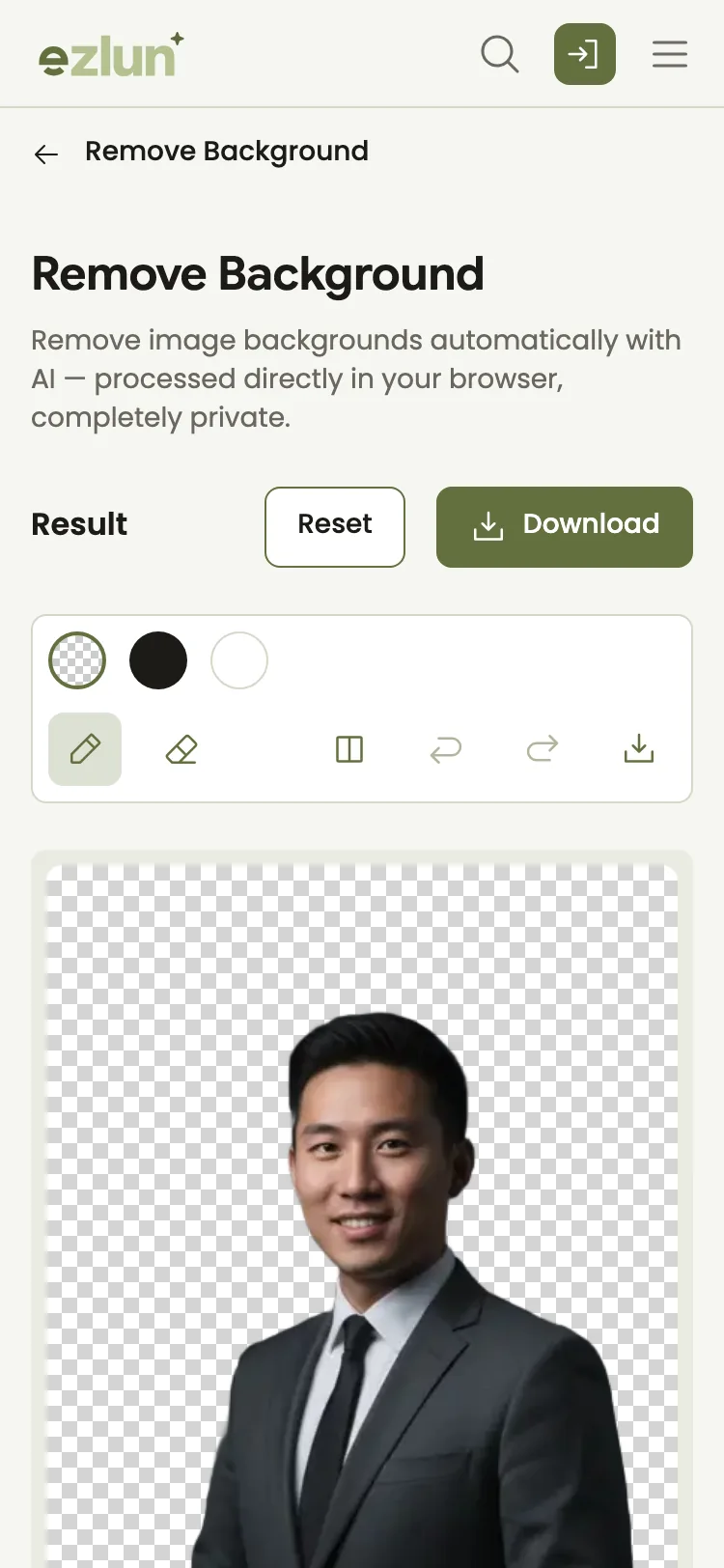
A cutout photo, ready to sit on a background color that matches your CV.
The guide to removing the background from a portrait photo covers hair and collar edges in detail.
What about AI-generated photos? You can use AI Image for a LinkedIn banner or portfolio illustrations. Your profile photo should still be real. Recruiters will meet you in the interview, and a photo that looks very different from you can come across as dishonest. The guide on how to write AI image prompts has examples for banners and illustrations.
Step 4: Bring it into your CV and LinkedIn
This is where everything comes together: your step 1 sentence becomes your summary, your step 2 color becomes your accent, and your step 3 photo becomes your profile picture.
With Ezlun's CV Builder:
Pick one of the 23 CV templates. If CVs with photos are common in your field, choose a template with a photo slot.
In personal details, upload your photo (up to 5MB), then crop and zoom so your face sits in the center.
Open the color picker and paste the HEX code you saved in step 2 as the CV's accent color.
Write your summary from your step 1 sentence. If you get stuck, AI can suggest content (1 energy per suggestion), but edit it until it is true to you.
Preview, then download the PDF when you are happy. Downloading a PDF requires signing in and uses 7 energy. You get 15 free energy every day.
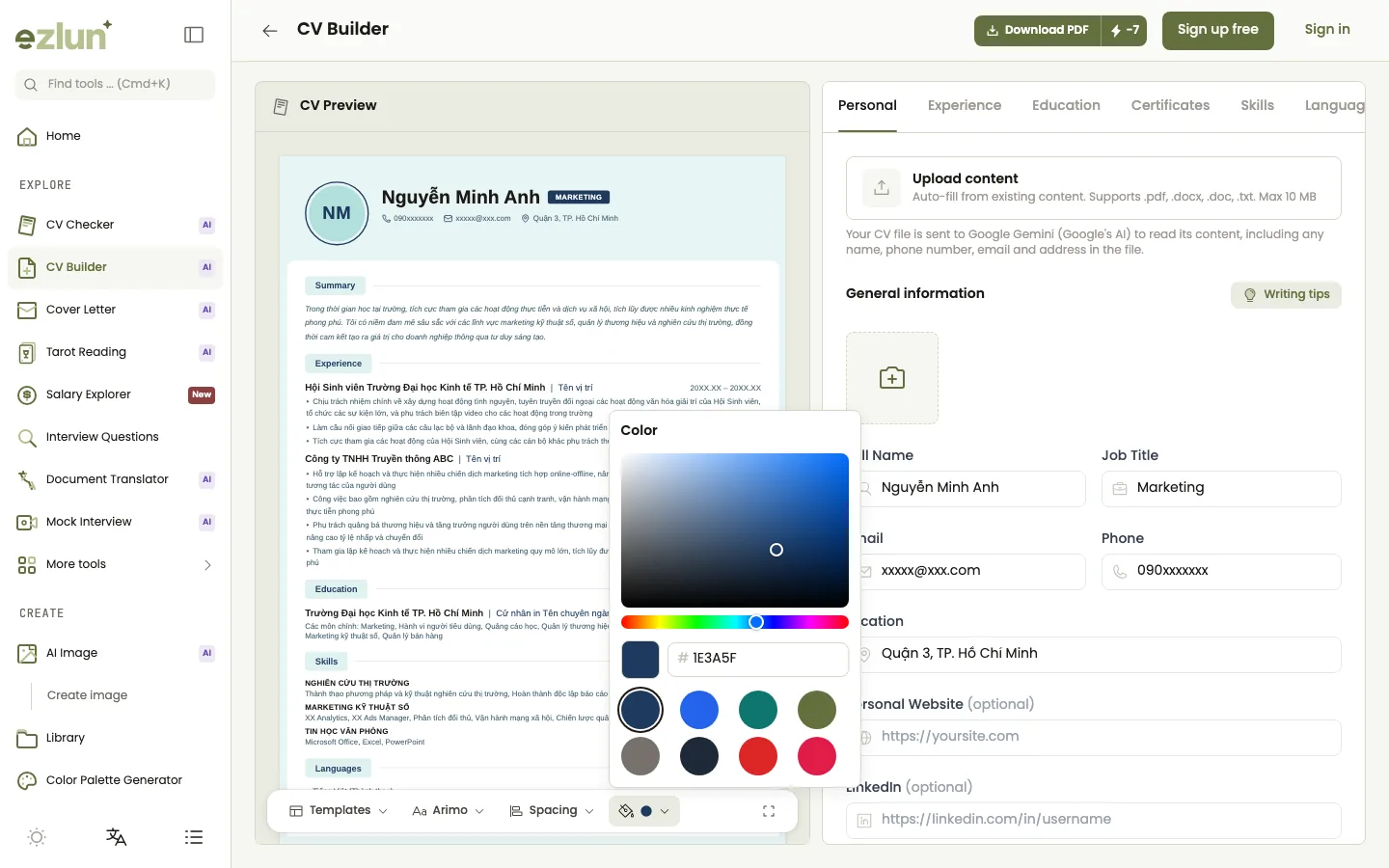
The accent color from the palette applied to the headings and dividers of a CV template.
Try switching templates on the sample CV below to see how the same content looks in different designs:
CV Builder
Pick a template to see the same sample CV change its look. This demo does not save or download anything.
On LinkedIn, use the same profile photo, base your headline on your step 1 sentence and pick a banner close to your accent color. The guide to optimizing your LinkedIn profile so recruiters find you walks through each section. If you are not sure which CV template to use, see how to choose a resume template.
What does consistency look like? Weak and better examples
Consistency means a recruiter moving from your CV to LinkedIn to your portfolio still sees the same person with the same message.
Touchpoint | Weak | Better |
|---|---|---|
Headline | CV says "Office assistant", LinkedIn says "Multi-skilled freelancer" | Both say "Data analyst, retail" |
Photo | Old ID photo on the CV, beach photo on LinkedIn | The same clear, tidy photo everywhere |
Color | Three colors on the CV, a completely different one on the portfolio | One shared accent color |
Summary | "Dynamic, hard-working, eager to learn" | "2 years analyzing sales data, cut inventory by 15% across a 30-store chain" |
The numbers in the "better" column only illustrate the writing style. On your own CV, use real numbers.
Limits and caveats
Tools only help with the look. The strongest personal brand comes from real experience and results.
You do not have to do everything at once. Short on time? Do your message and CV first, photo and colors later.
Whether to include a photo depends on the field and company. Some companies, especially international ones, discourage photos on CVs. Read the job ad carefully.
AI can be wrong. Read every AI suggestion and correct it so it reflects the facts.
Frequently asked questions
Do new graduates need a personal brand?
Yes, and simpler is better. When you have little experience, a clear message, a tidy CV and a LinkedIn profile that matches it help you stand out from generic applications. The fresh graduate job checklist for Vietnam has a full roadmap for people starting out.
Should I use an AI-generated profile photo?
No. Your profile photo on your CV and LinkedIn should be a real, recent photo of you. AI is fine for banners or portfolio illustrations, but not for your face.
Which colors suit which industries?
There is no hard rule. Fields that rely on trust, such as finance, tend toward deep colors like navy, while creative fields can use bolder ones. The key is one consistent accent color and text that is always easy to read.
Should my CV include a photo?
It depends on the field and where you apply. Many companies in Vietnam still expect a photo, while some international companies prefer none. If the job ad does not say, look at how the company presents its people on its careers page and LinkedIn, then decide.
Can a tarot reading help me choose a career?
No. A tarot reading is entertainment and can be a way to ask yourself questions, but it cannot predict which career suits you. When choosing a career, rely on real experience, your skills and conversations with people who do the job.
Summary
Personal branding for job seekers works best in this order: write one sentence about who you are, choose one accent color, prepare a real, tidy profile photo, then bring it all into your CV and LinkedIn so they match. The look makes your message memorable. Real proof is what makes the brand.
Start with the easiest step in Ezlun's Color Palette Generator, free and with no sign-up. If you also sell online or take freelance work, the guide to preparing product photos for an online store uses the same image tools. Once your message is clear, the job application documents checklist helps you finish your full application.


