
What Goes Into a Job Application? A Practical Checklist for CV, Cover Letter and Final Check
 Ezlun Team9 min read
A job application documents checklist for most online roles has three items: a CV (or resume), a cover letter, and a portfolio if your field expects one. Degree certificates, ID copies and references usually come later, once you are invited to interview or receive an offer.
This guide lists what each document is for, then walks through a simple three-step routine: build the CV, write the cover letter from the job description, and run a final check before you click submit. Each step links to a detailed guide and the matching Ezlun tool.
What goes into a job application?
A job application is the set of documents an employer uses to decide whether to interview you. Not every role needs everything, so read the job ad first. This table covers what you are most likely to be asked for.
Document | Required or optional | Notes |
|---|---|---|
CV or resume | Required | 1-2 pages, PDF, tailored to each role |
Cover letter | Optional, but recommended | Required when the ad asks for one; helps when many people apply |
Portfolio | Depends on the field | Close to essential in design, writing, architecture and engineering (GitHub link) |
Certificates and transcripts | When requested | Keep clear scans ready to send quickly |
References | Depends on the employer | Ask your referees first; list name, title and contact details |
Application form | Depends on the employer | Some companies use their own online form on top of the CV |
A strong application does not need to be thick. What matters is that every document fits the role and has no basic mistakes.
How to prepare your application in 3 steps
The cleanest order is: CV first, cover letter based on the CV and the job description (JD), then a check of both before sending. Writing the letter first often leads to a letter and a CV that tell slightly different stories.
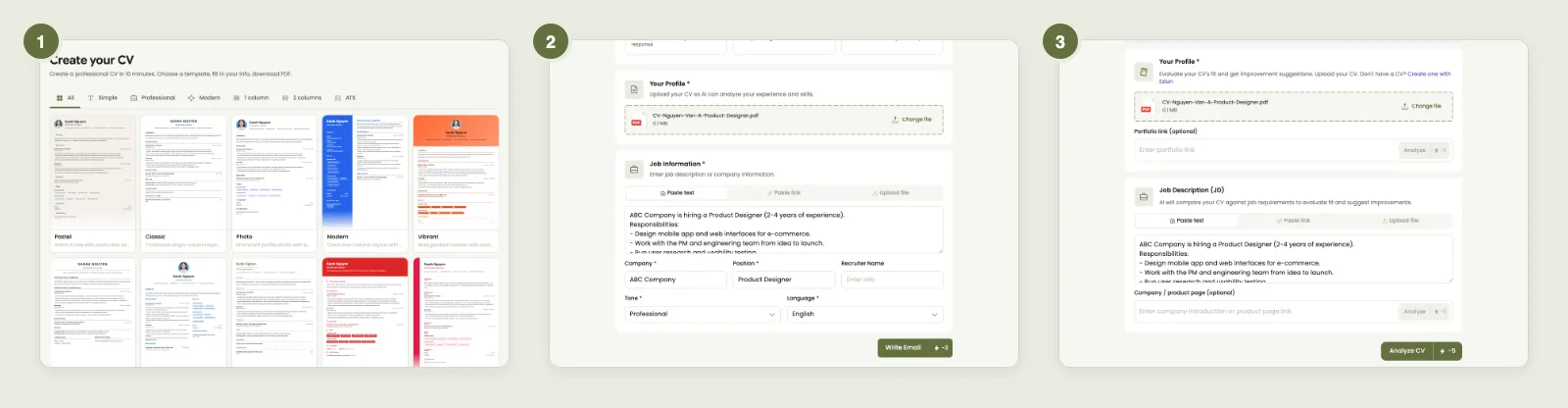
The three steps in order: CV Builder, Cover Letter, CV Checker.
Build or update your CV for the role you are targeting.
Write a cover letter using that CV and the job description.
Run a final check of the CV (and letter) against the JD, fix weak spots, then apply.
The next three sections go through each step.
Step 1: Build your CV
The CV is the one document that is almost always required, so give it the most time. An easy-to-read CV usually has contact details, a 2-3 sentence summary, experience in reverse order (most recent first), skills tied to the job, and education.
What to do at this step:
Pick a template that suits your field. Finance and law tend to suit clean single-column layouts; creative roles can use more color, as long as the CV stays readable. The guide on how to choose a resume template compares the main styles.
Describe each role by results, not just a list of duties.
Keep every detail true. Numbers, titles and dates can all come up again in the interview.
Ezlun's CV Builder has 23 templates and lets you switch between them without retyping your content. AI can suggest a summary, experience bullets or skills (1 credit per suggestion). Writing and previewing the CV costs nothing; downloading the PDF uses 7 credits.
If you are a student or recent graduate with little work history, see how to write a CV for fresh graduates with no experience for ways to include study projects and activities.
Step 2: Write a cover letter from the job description
A cover letter answers what the CV does not answer directly: why you want this role and why you fit it. Effective letters are short, around 3-4 paragraphs, and address the 2-3 most important requirements in the JD with evidence from your experience.
A simple structure:
Opening: the role, where you saw it, and one line on why it interests you.
Body: 2-3 experiences or results that match the main requirements.
Closing: that you would welcome a conversation, and how to reach you.
Ezlun's Cover Letter tool takes your CV (upload a PDF, DOCX or TXT up to 10MB, or paste the text) and the job description (paste text, paste a link or upload a file). It then writes a letter in English or Vietnamese in one of four tones: professional, confident, warm or creative. Each letter uses 3 credits. When you paste a JD, the tool can also read the company name and job title to fill them in for you, for 1 extra credit.
For a full walkthrough and how to edit the AI draft, read how to write a cover letter from a job description.
Step 3: Check everything before you apply
This is the step people skip because they are tired after the first two, yet it is the cheapest way to avoid mistakes. Reread everything once yourself, then get a second reader.
Quick self-check:
Contact details are correct and links work.
The company name and job title in the letter match the ad (a common slip when reusing an old letter).
The CV includes the terms the JD repeats, written the way the JD writes them.
The PDF opens without layout problems and has a clear file name.
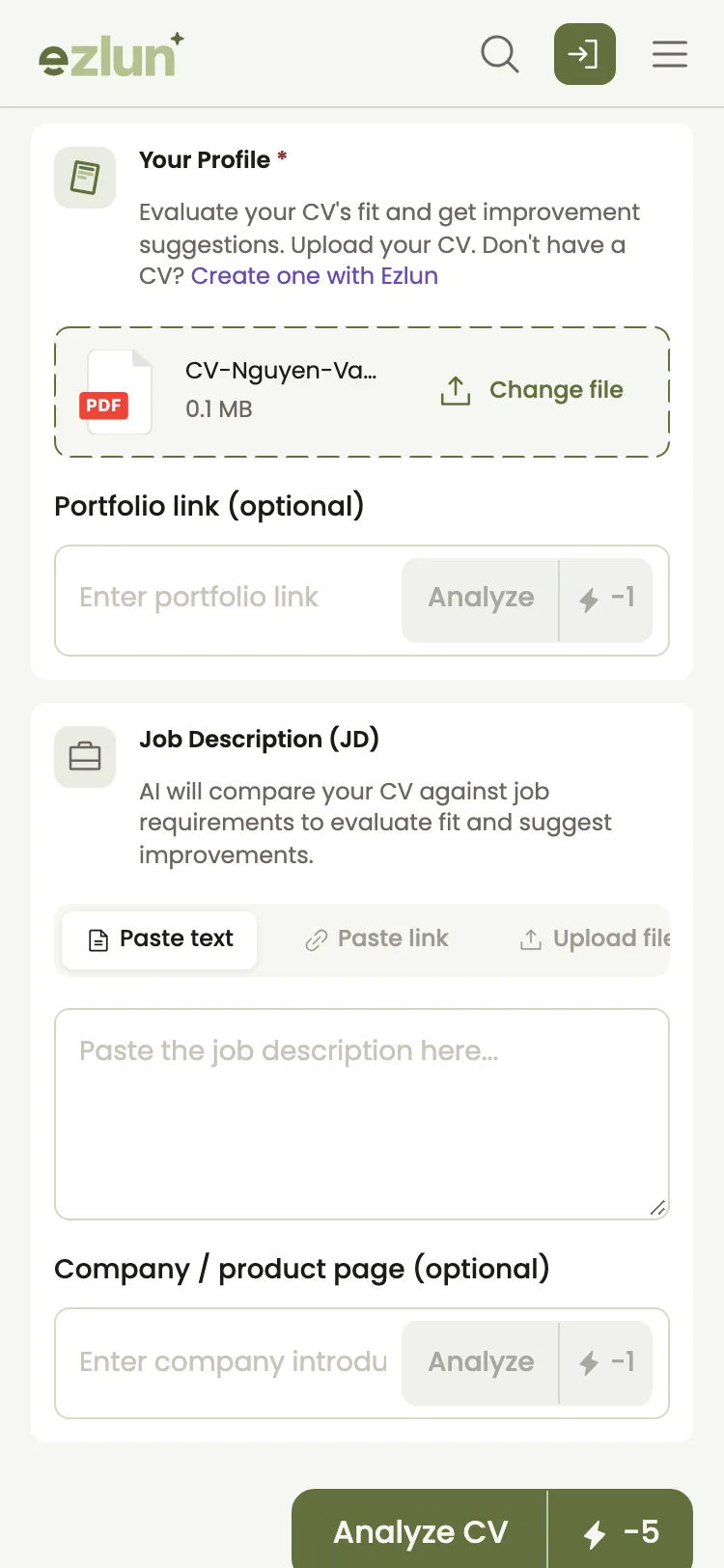
CV Checker on a phone: upload the CV, paste the JD, then read the report tab by tab.
For the second reader, Ezlun's CV Checker scores your CV on 6 criteria weighted for your field, compares it with the JD if you paste one, and checks how readable it is for applicant tracking systems (ATS). Each check uses 5 credits. The guide on how to check your resume before applying explains how to read the report and what to fix first.
How many credits does one full application take? If you use Ezlun for all three steps for one role:
Task | Credits |
|---|---|
Download the CV as a PDF from CV Builder | 7 |
Write one cover letter | 3 |
Read company and role details from the JD | 1 |
One CV Checker report | 5 |
Total | 16 |
You get 15 free credits each day, so you can split the work over two days, or run the check on a CV file you already have. AI suggestions in CV Builder use 1 credit each on top of this.
Documents you may need after the interview
Once you are invited to interview or offered the job, the employer may ask for more. These are common requests; every company is different, so confirm the exact list with HR.
Copies of degrees, transcripts or professional certificates.
A copy of your ID or passport, and a work permit if one applies.
Reference contacts, sometimes with written references.
Details needed for payroll, tax and insurance registration.
For in-person interviews, bring a printed copy of the exact CV you sent. Interviewers do not always have one in front of them. If you are planning your prep time, continue with how to prepare for an interview in 7 days.
Common job application mistakes
Most mistakes are about details, not ability. Here are the usual ones and the fix for each.
Mistake | Better |
|---|---|
Sending the same CV to every role | Adjust the summary and experience to each JD |
A cover letter that repeats the CV | Pick 2-3 points and explain why they make you a fit |
Forgetting to change the company name in a reused letter | Reread company, role and recipient name before sending |
File named |
|
Nested tables and text inside images | A simple layout with real text that software can read |
An unprofessional email address | An address based on your name |
7 common CV mistakes that get you rejected has detailed examples of each, and what is ATS and how to write an ATS-friendly resume explains why layout affects screening software.
Limits of the tools
Tools make the work faster, but they do not replace your own review:
AI can be wrong or add details that are not true. Read every suggestion and remove numbers or skills you do not have.
CV Checker scores are a guide, not a promise of an interview.
Document requirements vary by employer. This checklist covers what is common, not a fixed rule.
If you are graduating soon and putting together your first application, the fresh graduate job checklist for Vietnam goes from the CV all the way to your first payslip.
Frequently asked questions
What do I need for an online job application?
Usually a CV in PDF, a cover letter if the ad asks for one or has a field for it, and a portfolio link if your field expects it. Read the ad carefully, because some employers also use their own application form.
Do I need a cover letter for every job?
Not for every role. But when the ad asks for one, or when you are changing fields and need to explain why, a letter helps the employer understand you better than the CV alone.
How should I name my CV file?
Use your name, the word CV and the role, for example JaneNguyen_CV_Marketing.pdf. Avoid names like CV_final_2.pdf; recruiters receive many files and need to find yours again.
Which documents are needed after I get an offer?
It depends on the employer. Common requests are copies of degrees and certificates, ID, references and the details HR needs for payroll and insurance. Ask HR for the exact list before you start gathering paperwork.
How many jobs should I apply to each week?
There is no number that suits everyone. A smaller number of applications, each tailored to its JD, usually works better than the same CV sent everywhere. Choose a pace that still leaves time to adjust each application.
Summary
A job application for most online roles comes down to a CV, a cover letter and a portfolio if your field needs one, with other documents ready for later stages. Work in order: build the CV, write the letter from the JD, check before you send, and tailor each application instead of sending one version everywhere.
You can start with Ezlun's CV Builder, then use your free daily credits to write the letter and check your CV.


