
How to Check Your Resume Before Applying (With Ezlun's AI CV Checker)
 Ezlun Team8 min read
How to check your resume before applying: do it in two passes. First, review it yourself against a fixed checklist (contact details, numbers, job description keywords, file format). Then get an objective second reader, a person or a tool, to score it. Together, the two passes catch most mistakes before a recruiter sees them.
This guide covers both passes. The second half walks you through Ezlun's CV Checker, an AI tool that scores your resume against the criteria for your field and compares it with the job description (JD).
Why check your resume before you apply?
Because resumes get skimmed fast, and one small error can stop a recruiter from reading the rest. Checking first lets you fix problems while you still can, instead of guessing why nobody called back.
Three concrete reasons:
Your first reader may be software. Many companies use an applicant tracking system (ATS) to sort resumes by keywords. A file that is hard to parse, or that misses the JD's keywords, can end up near the bottom. More on this in what an ATS is and how to write an ATS-friendly resume.
You can't easily see your own mistakes. You read your resume from memory, so outdated numbers and overlapping dates slip through.
Each role needs a slightly different version. One generic resume sent everywhere rarely matches any single JD well.
A 5-step self-check before you use any tool
Start with your own review. No tool can fully do this part for you.
Contact details: phone number, email and LinkedIn or portfolio links are correct and clickable.
Dates and titles: dates don't overlap, and job titles match your contract or LinkedIn profile.
Results with numbers: each main role has at least one measurable result (revenue, time saved, users reached).
JD keywords: skills the JD mentions more than once appear in your resume, using the same wording.
The file itself: export to PDF, give it a clear name (for example
Jane_Doe_Resume_Marketing.pdf) and open it once to make sure the layout holds.
Not sure which mistakes are most common? 7 common CV mistakes that get you rejected shows an example and a fix for each.
What criteria does the CV Checker score?
Ezlun's CV Checker scores 6 weighted criteria, and the set changes with the profession it detects from your resume. Criteria that matter more in your field carry more weight.
Field (examples) | Field-specific criteria | Shared criteria |
|---|---|---|
Tech, data | Projects & GitHub | Work Experience, Skills, Professional Summary, Education, Format & ATS |
Marketing | Campaigns & Case Studies | same as above |
Finance, accounting | Certifications & Credentials | same as above |
Healthcare | Certifications & Licenses, Research & Publications | Work Experience, Professional Summary, Education, Format & ATS |
Design | Portfolio & Case Studies | same as above |
For a tech resume, for example, Work Experience is worth 30% of the score and Format & ATS is worth 10%. For a design resume, Portfolio & Case Studies is worth 25% and Format & ATS rises to 15%, because presentation is part of a designer's skill set.
Beyond the criteria scores, the report has three more sections: an ATS check (how readable your resume is for screening software), JD match (when you paste a job description) and interview questions (what a recruiter might ask based on your resume).
How to use the CV Checker, step by step
The whole process takes six steps. Most of the time is spent waiting for the AI to read your resume and build the report.
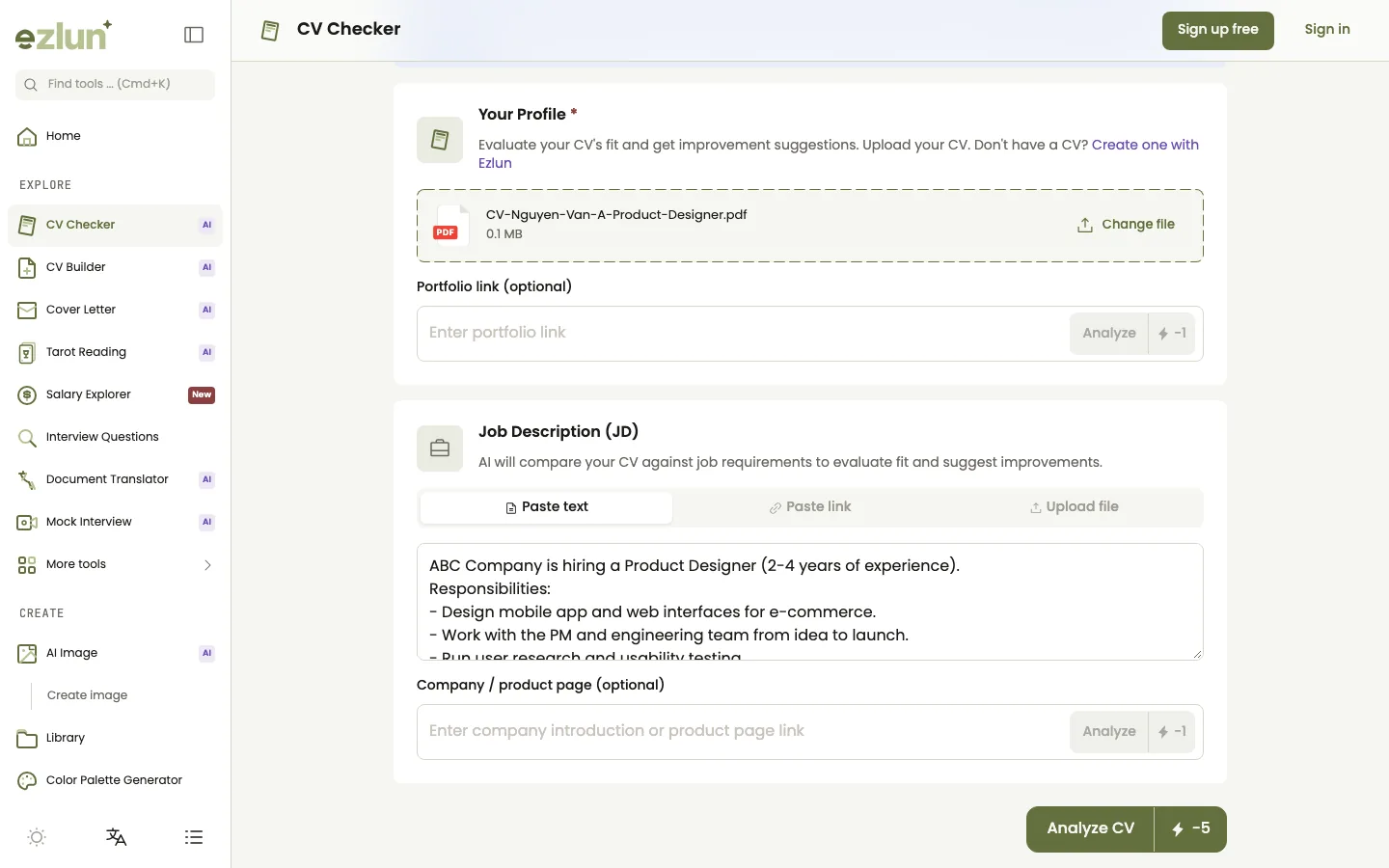
Upload your resume and portfolio links on the left, paste the job description on the right.
Open the tool at ezlun.com/en/tools/cv-checker.
Upload your resume: drag and drop or choose a PDF, DOCX or TXT file, up to 10MB. If you have a portfolio, add a link or upload up to 5 screenshots.
Add the job description (optional, but recommended): paste the JD text, paste a link to the job post, or upload the JD as a file.
Add company information (optional): a link to the company's About or product page, so the AI can also comment on how well you fit their environment.
Click "Analyze CV" and wait. You'll see each stage: reading your CV, summarizing, detailed analysis, building the report.
Read the report tab by tab: CV Overview, ATS, JD Match, Interview Questions. If you like, send the result to the CV Builder and edit it right away.
How to read your results
Read the report in order: the overall score tells you where you stand, then the lowest-scoring criteria tell you what to fix first. Don't try to max out every criterion. Fixing your two or three weakest areas usually pays off more.
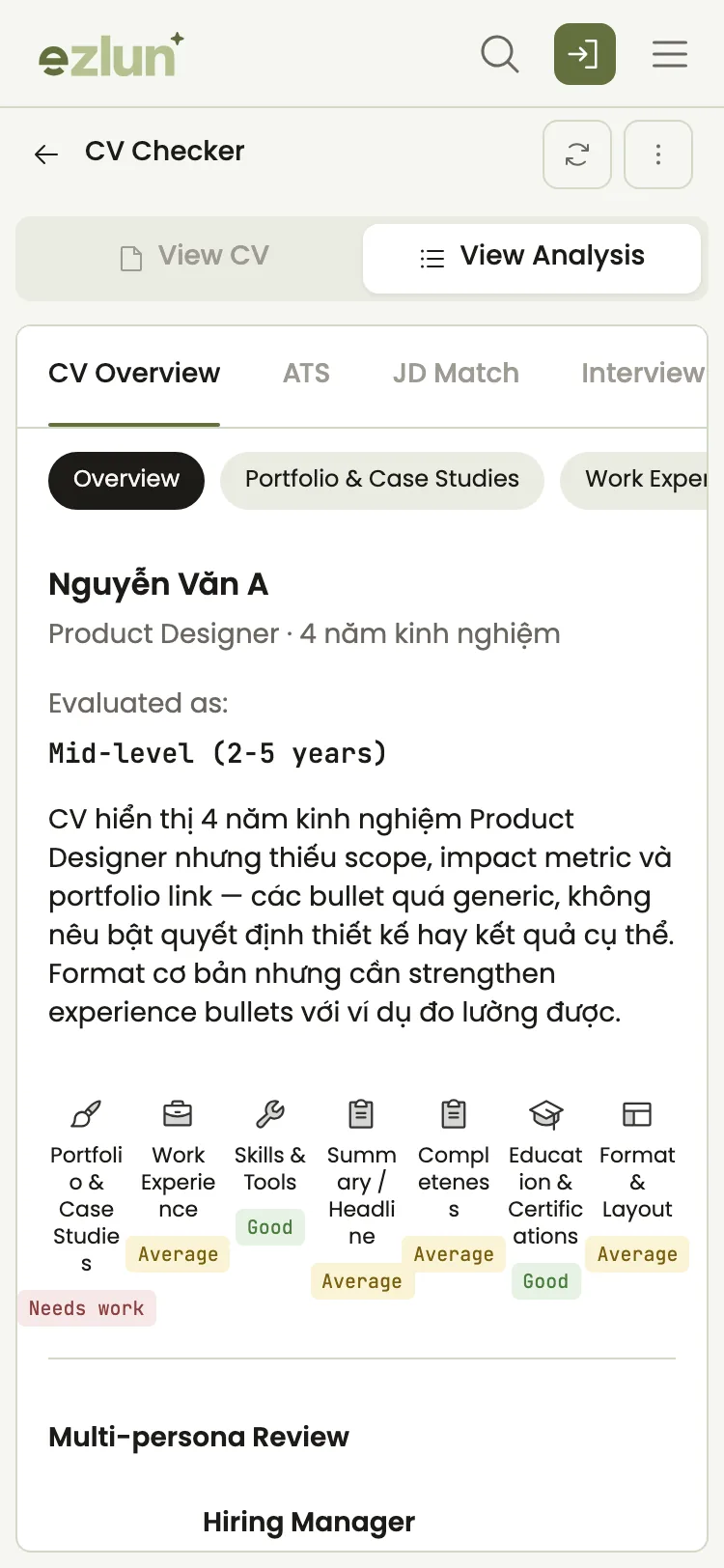
On a phone: the overall score at the top, each criterion and its feedback below.
Low score in | Usually because | What to change |
|---|---|---|
Work Experience | Lists duties, not results | Rewrite each bullet as "what you did, how, and what changed" |
Skills | Generic skills not tied to real work | Keep only skills the JD asks for, and say where you used them |
Professional Summary | A long opener that doesn't say what you do | Two or three sentences: role, years of experience, main strength |
Format & ATS | Nested tables, text inside images, complex columns | Use a simple one- or two-column layout with real text |
JD Match | Missing keywords the JD repeats | Add the JD's exact terms to the experience where they apply |
Each comment in the report quotes the original line from your resume and suggests a rewrite. For example:
Weak: "Responsible for Facebook ad campaigns."
Stronger: "Ran 12 Facebook ad campaigns over 6 months, cutting cost per order from $3.40 to $2.40."
Any number in a rewrite has to be your real number. If the AI suggests a figure you don't have, replace it with the true one or remove it.
Why paste the job description?
With a JD, the tool also scores how well your resume fits that specific role: which requirements already have evidence in your resume, and which are missing. Without one, you get a general review for your field.
How to get the most out of it:
Run a new check with each new role's JD.
Prioritize requirements the JD repeats that your resume lacks, as long as you genuinely have that experience.
Don't paste JD sentences into your resume. Describe your own experience, using the same terms the JD uses.
Once your resume matches the JD, the next step is to write a cover letter from that job description. If you are putting together a full application, the job application documents checklist covers everything you need.
What the tool can't do
The CV Checker is a fast, consistent second reader. It isn't a recruiter. Keep these limits in mind:
A high score doesn't guarantee an interview. Every company screens and reads differently.
The AI can misread your file when the layout is complex, text sits inside images or fonts are broken. If a comment doesn't match your resume, check the file first.
Suggested rewrites need your judgment. Keep everything true. Don't add skills or numbers you don't have.
Results are a guide. For an important role, ask someone in your field to read it too.
Frequently asked questions
Is an AI resume checker accurate?
It is consistent and quick at spotting common issues: vague bullets, missing keywords, layouts that parse badly. It can still misread unusual files or miss context only you know. Treat it as a second opinion and confirm each suggestion against your real experience.
How much does it cost?
Each analysis uses 5 credits. You get 15 free credits every day, enough for up to 3 checks if you don't use other AI tools. You can buy credit packs if you need more. Fetching content from a link (a JD or a company page) uses 1 extra credit each time.
Is my resume stored after the check?
Your resume is sent to an AI service for analysis. Ezlun doesn't keep it after the analysis is done. It is only saved if you choose to send the result to the CV Builder to keep editing.
Does a high score guarantee I pass ATS?
No. Each ATS and each company filters differently. A high score means your resume is easy to read and matches common criteria for your field, which improves your chances of a careful read. It isn't a promise.
Should I upload a PDF or a Word file?
The tool reads PDF, DOCX and TXT. When you apply, a PDF is usually safer because it keeps your layout, unless the job post asks for Word.
Summary
Check your resume in two passes: a 5-step self-review, then a second reader that scores it against your field's criteria and the JD. When you read the results, focus on your two or three weakest criteria and only add information that is true.
Next steps after fixing your resume: see how to choose a resume template for a cleaner layout, then follow a plan to prepare for an interview in 7 days.
You can start now with Ezlun's CV Checker, using your free daily credits.


