
How to Write a Cover Letter From a Job Description (With AI Help)
 Ezlun Team7 min read
To write a cover letter from a job description, pick the two or three most important requirements in the JD, then use real experience to show you meet them. The letter doesn't need to retell your resume. It needs to show the reader you fit this specific role.
This guide covers how to read a JD, how to structure the letter, how to get a first draft with Ezlun's Cover Letter tool, and how to edit it so it sounds like you.
Read the JD to find the 3 things the employer really needs
Job descriptions are long, but not every line matters equally. Read it in three passes:
Mark the repeats. A skill or responsibility mentioned two or three times is usually the one that matters most.
Separate "required" from "nice to have". Lines with "must", "minimum" or a number of years are the requirements. Lines like "a plus" are bonuses.
Look for the problem they're trying to solve. If the JD keeps mentioning "expanding into new channels", they need someone who has built a channel, not just someone who has run an existing one.
After three passes, write down the three things the employer needs most, and next to each one, a specific experience of yours. That is the core of your letter.
How should a cover letter be structured?
A cover letter sent by email should be short, around 200-250 words, and split into these parts:
Part | What goes in it | Length |
|---|---|---|
Greeting | The recipient's name if you know it; avoid "To whom it may concern" | 1 line |
Paragraph 1: Opening | The role, where you saw it, and one sentence on why you fit | 2-3 sentences |
Paragraph 2: Evidence | 2-3 experiences that match the JD's top needs, with concrete results | 2-3 sentences |
Paragraph 3: Why this company | One specific thing about the company or product that makes you want to work there | 2-3 sentences |
Closing | You'd welcome a conversation, plus your contact details | 1-2 lines |
New to cover letters? What is a cover letter explains the basics and when you need to send one.
How to use Ezlun's Cover Letter tool
The tool reads your resume and the JD, then drafts a letter around the points where they match. You need to sign in to use it.
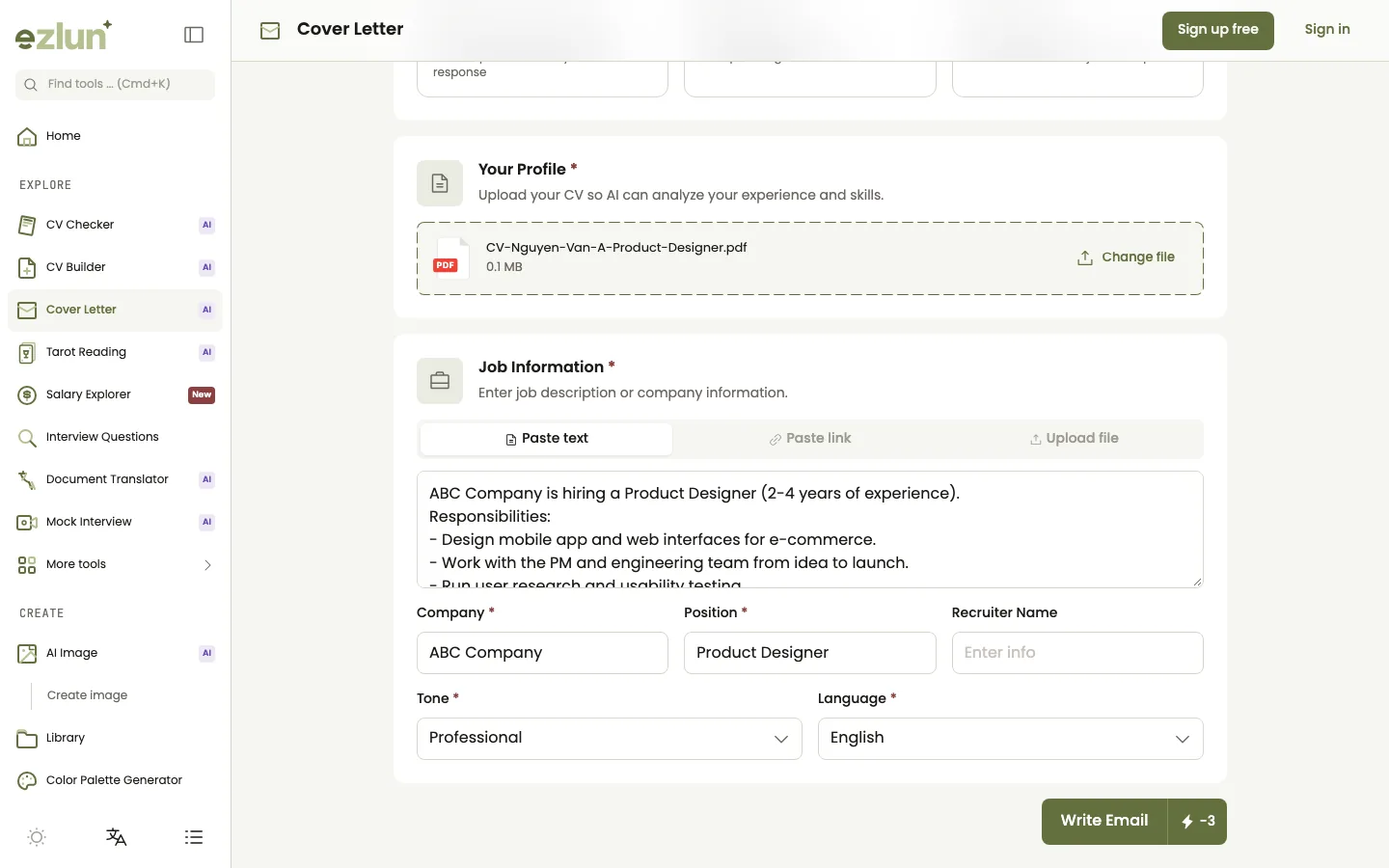
Choose the email type, upload your resume and paste the job description on one screen.
Open the tool at ezlun.com/en/tools/cover-letter and sign in.
Choose the "Cover Letter" email type. There are five other types: Follow-up After Applying, Post-Interview Thank You, Follow-up After Interview, Offer Response, and Cold Outreach for when there's no JD yet.
Upload your resume as a PDF, DOC, DOCX or TXT file.
Add the job details: paste the JD, paste a link to the job post, or upload the JD as a file. The tool can fill in the company name, role and recruiter's name from the JD; double-check those fields.
Pick a tone and language: Professional, Confident or Warm; English or Vietnamese.
Click "Write Email" and wait for the draft. Each generated letter is saved to your account so you can open it again later.
Edit and save: click "Edit" to change the text directly, or "Regenerate" for a different version.
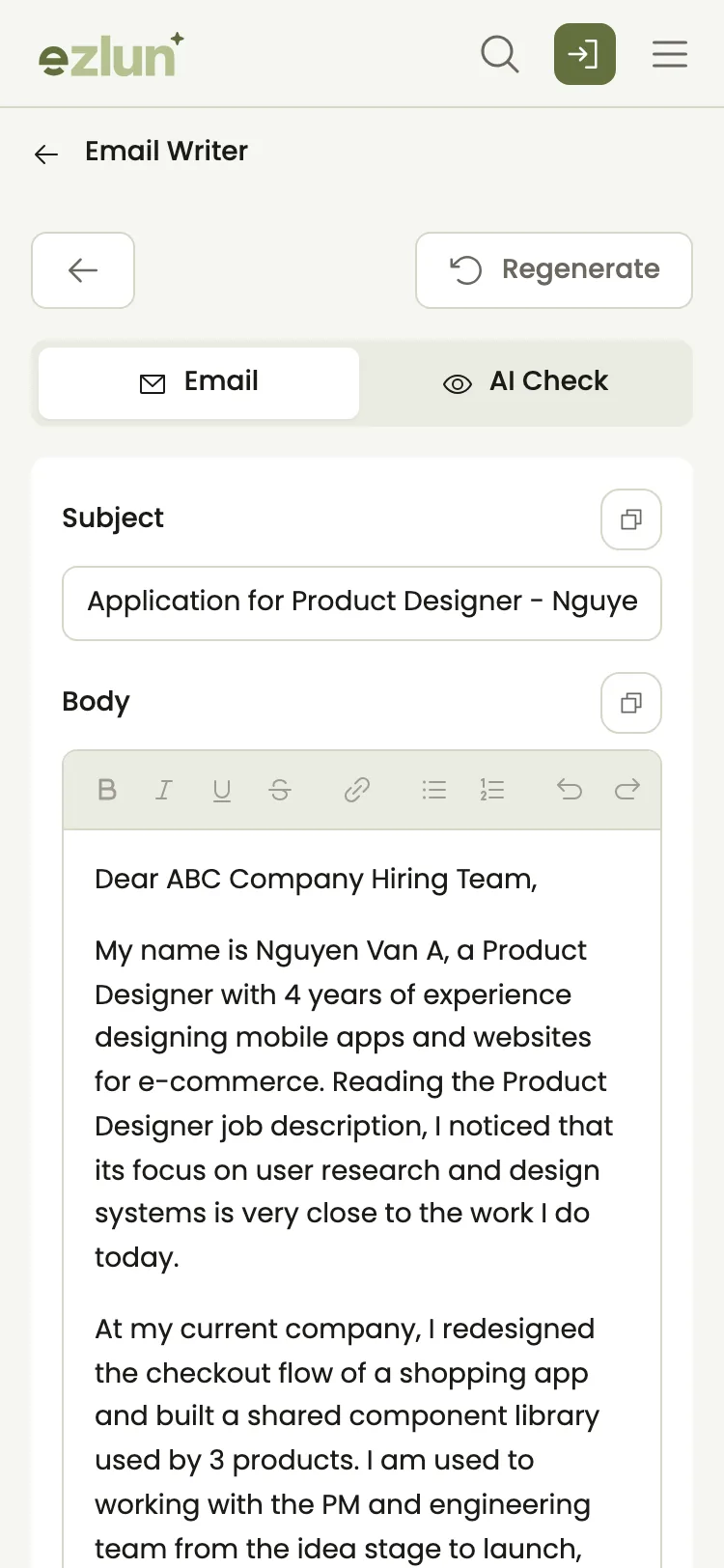
The draft on a phone, with a check showing how much the text reads like AI writing.
After each draft, the tool also flags sentences that read like AI writing and explains why. Those are the sentences to rewrite first.
Editing the AI draft: weak vs stronger
The AI draft is a starting point. Here are the three most common problems and how to fix them:
Too generic.
Weak: "I am a dynamic, passionate person who is always eager to learn."
Stronger: "In eight months as a marketing assistant, I taught myself Google Analytics so I could build the team's weekly report."
Praising the company with no reason.
Weak: "I greatly admire your company as an industry leader."
Stronger: "I've used your app for two years, and its recurring booking feature is the reason I recommended it to my colleagues."
Numbers that aren't yours. If the AI writes a figure you don't have, replace it with the real one or remove it.
The details in these examples are only illustrations. A quick test: read the letter out loud. Any sentence you'd never say to a real person needs rewriting.
When can you skip the cover letter?
You don't always need a full letter. You can skip it or keep it very short when:
The job post says a resume is all you need, or the application portal has no field for a letter.
You're applying through a form with its own questions; put your effort into those answers instead.
You were referred directly; a short three- or four-sentence email is usually enough.
On the other hand, do send one when you're changing careers, have a gap in your resume to explain, or are applying for a competitive role.
Before you send it, check your resume before applying so your letter and resume tell the same story, and choose a resume template that suits your field. The job application documents checklist brings the whole application together. After the interview, you can use the same tool to write a thank-you email, or read these interview follow-up email templates.
What the tool can't do
The AI only knows what's in your resume and the JD. If something isn't in your resume, the AI can't put it in the letter.
The draft can get details wrong. Always check the company name, role and recipient's name before you send.
The AI-writing check is an estimate. It helps you find sentences to rework; it isn't a definitive verdict.
A letter can't make up for a real mismatch. If you lack a hard requirement in the JD, even a great letter will struggle to cover it.
Frequently asked questions
Can recruiters tell if AI wrote my cover letter?
Sometimes. AI text tends to have evenly sized sentences and generic phrasing, and people who read many letters notice it. The best approach is to treat the AI version as a draft and rewrite it with your own examples and way of speaking.
How do I tailor a cover letter to a job description?
Find the two or three requirements the JD repeats or marks as required, then give one concrete experience with a result for each. Use the same terms the JD uses, but in your own sentences.
How long should a cover letter be?
Around 200-250 words for an emailed letter, which takes less than a minute to read. A short letter that hits the JD's top needs works better than a long one that retells your whole resume.
Should I use a cover letter generator?
A generator is useful for a fast first draft built from your resume and the JD. It works best when you then edit it: check every fact, cut generic lines and add one detail only you could know.
Do I need an account, and does it cost anything?
You need to sign in. Each letter uses 3 credits, and auto-filling details from the JD uses 1 more. You get 15 free credits every day, and you can buy credit packs if you need more.
Summary
Writing a cover letter from a job description comes down to three steps: read the JD to find the three most important needs, match each one with a real experience and a result, and keep it short and in your own voice. AI gets you a draft fast; your own details are what make the letter stand out.
Once your letter is sent, use a plan to prepare for an interview in 7 days so you're ready if the recruiter calls back.
You can try it now with Ezlun's Cover Letter tool, using your free daily credits.


