
What Is a HEIC File? How to Open and Convert It
 Ezlun Team7 min read
What is a HEIC file? It's the default photo format on iPhones and iPads. HEIC photos are smaller than JPGs at the same quality, but many computers, apps and upload forms still can't open them. The quickest fix is to convert HEIC to JPG or PNG, which you can do in your browser with nothing to install.
This guide explains the format, how to open it on a computer, and then how to use Ezlun's File Converter for three common jobs: HEIC to JPG, PNG to WebP for websites, and TTF fonts to WOFF.
What is a HEIC file, and why won't it open?
HEIC is the photo format iPhones and iPads use by default. HEIC photos are usually smaller than JPGs at the same quality, which saves storage on your phone. The trouble is that many places still can't read it:
Windows may not open HEIC files unless the HEIF image extension from the Microsoft Store is installed.
Websites and application forms often accept only JPG or PNG.
Older software, including some photo editors and office apps, doesn't recognize the .heic extension.
If you regularly share photos with people on computers, you can change your iPhone setting: go to Settings > Camera > Formats and choose Most Compatible. Your phone will then shoot JPG. Photos you've already taken still need converting.
How to open a HEIC file: convert it to JPG with Ezlun
It takes a few steps. Most of the time is just your browser processing the image.
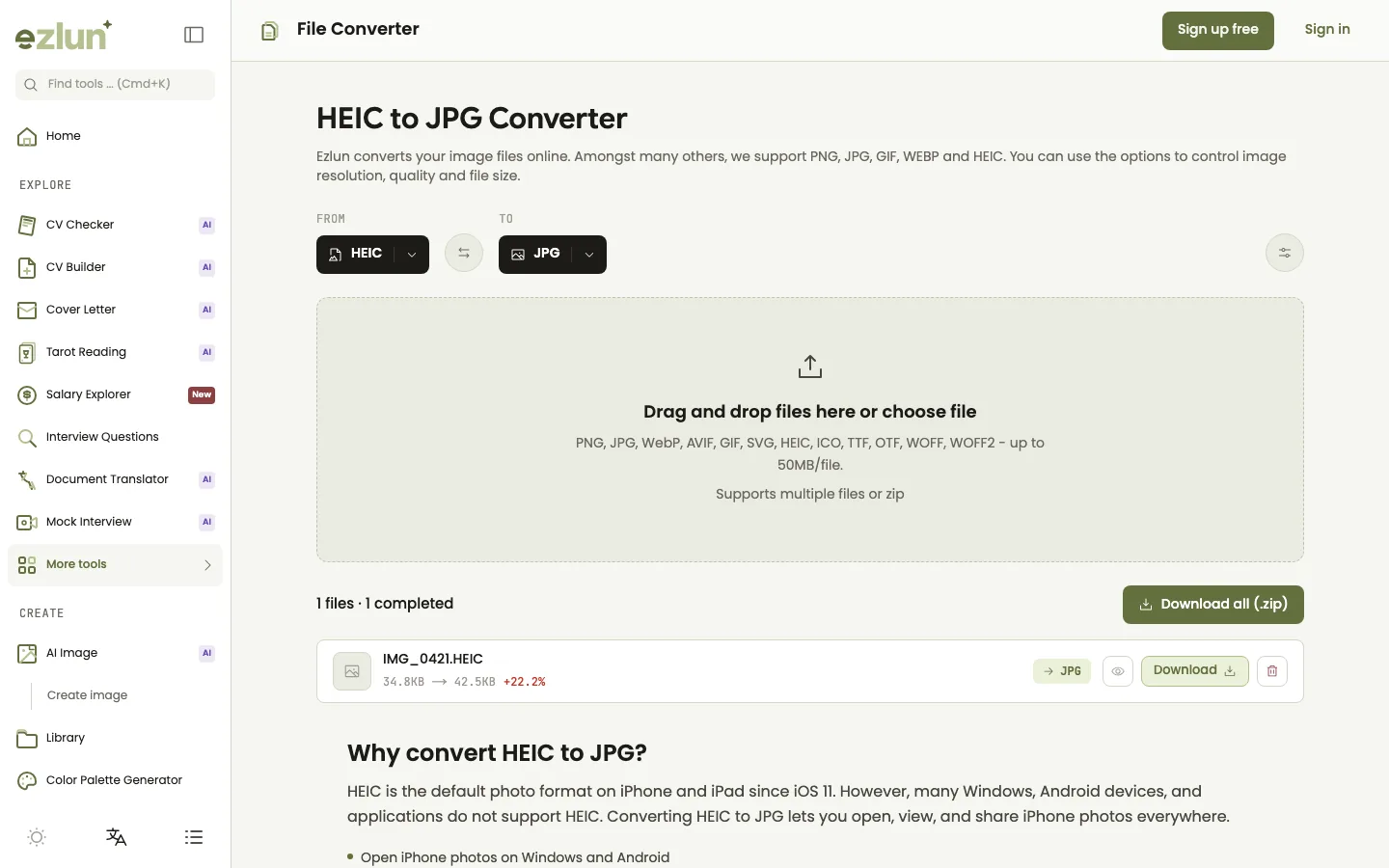
Pick the source and target formats in the top row, then drop your files into the box below.
Open the tool at ezlun.com/en/tools/file-converter. You can also go straight to Ezlun's HEIC to JPG converter with the formats already selected.
Choose the formats: set "From" to HEIC and "To" to JPG. If you need the highest quality or plan to edit the image later, choose PNG instead.
Drop your photos into the box or click "choose file". You can add several photos at once.
Wait for the conversion. Each file shows a progress bar, then its size before and after.
Download: click "Download" on each file, or "Download all (.zip)" when you have several.
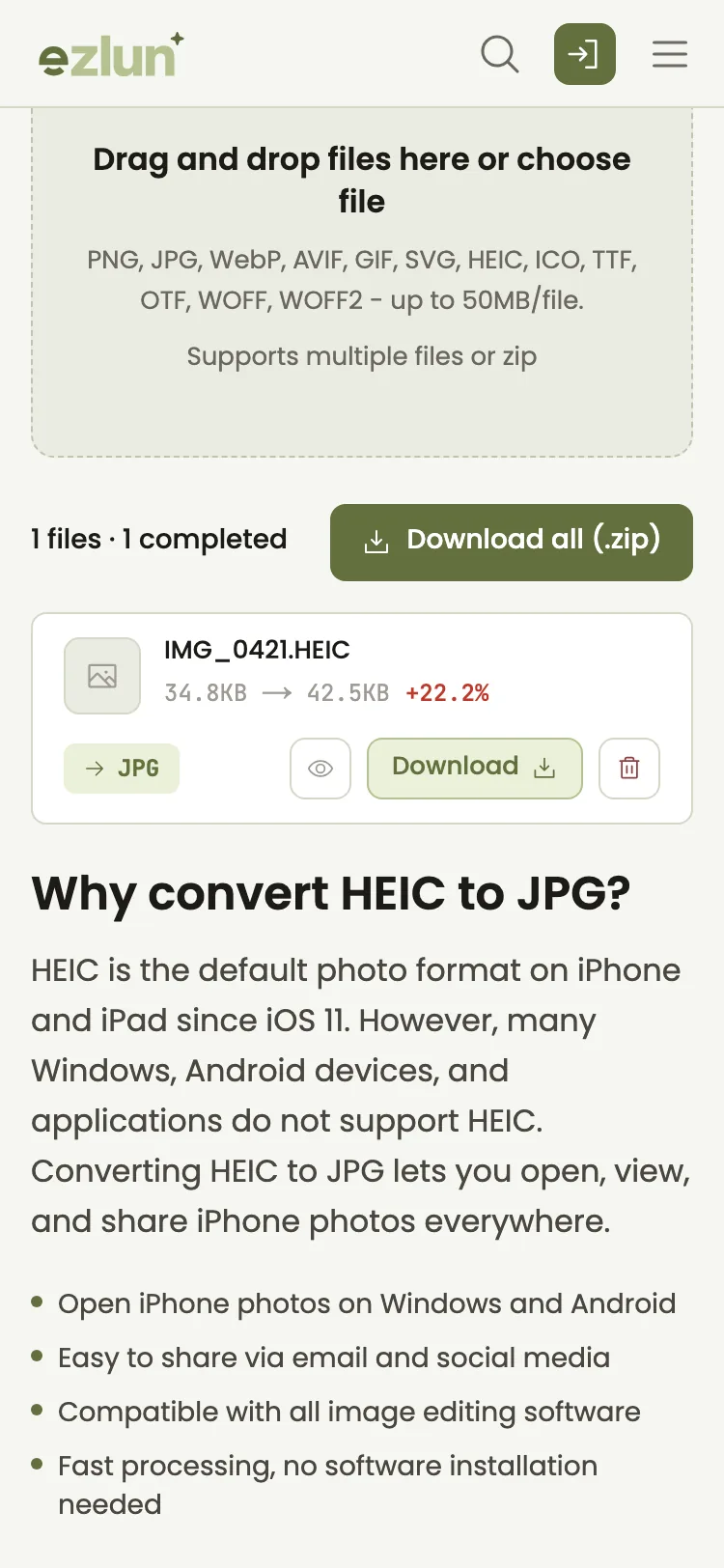
On a phone, each file shows its original size, its new size and a download button.
Each file can be up to 50MB. Files over 10MB require a free sign-in. The tool doesn't use any energy.
When should you convert PNG to WebP?
Convert PNG to WebP when the image is going on a website and you want the page to load faster. WebP is usually smaller than PNG or JPG at similar quality, still supports transparency, and current versions of all major browsers display it.
Format | Best for | Watch out for |
|---|---|---|
JPG | Photos, email attachments, job applications | No transparency; heavy compression shows artifacts |
PNG | Logos, screenshots, images that need transparency | Large files for colorful photos |
WebP | Images on websites, blogs and online stores | Some older software can't open it |
AVIF | Websites chasing the smallest files | Slower to encode, less software support than WebP |
Converting PNG to WebP uses the same steps as above: choose PNG under "From" and WebP under "To", or open the PNG to WebP converter directly.
Click Customize next to the format boxes for more control:
Quality (default 85): lower numbers mean smaller files but softer images. For web images, 75 to 85 is usually enough.
Width and height (0 keeps the original): shrink the image as you convert, for example from 4,000px to 1,600px for a blog.
If your main goal is a smaller file rather than a different format, see our guide on how to reduce PDF file size in your browser.
How to convert TTF to WOFF for a website
WOFF is a font format made for the web: browsers load it through CSS @font-face. If you downloaded a font as TTF or OTF, you can convert it to WOFF for your site.
Set "From" to TTF (or OTF) and "To" to WOFF, or open the TTF to WOFF converter.
Drop the font file into the box and wait for it to finish.
Download the .woff file and reference it in your site's CSS.
The tool can also convert between TTF and OTF, and it can read WOFF and WOFF2 files to turn them back into TTF, OTF or WOFF. It can't output WOFF2 yet. If your site needs WOFF2 specifically, use another tool for that step.
Before you use a font on a website, check its license. Some fonts are free for print but don't allow web embedding.
Will image quality drop?
It can drop slightly, depending on the format you choose:
JPG and WebP use lossy compression, so images converted to them are always recompressed. At quality 85, most people can't see a difference in everyday photos.
PNG is lossless: every detail stays, but files are usually larger.
HEIC to JPG uses a fixed quality of 85%.
There's also a safety check. When converting to JPG or WebP, if the new file comes out heavier than the original, the tool automatically tries lower quality settings so the file doesn't grow for no reason. On phones, images with a long edge over 4,096px are scaled down to 4,096px so the browser doesn't freeze.
One more thing to know: when the browser redraws an image to convert it, embedded metadata such as the capture date or GPS location (EXIF data) usually isn't carried over. If you need that information, keep the original file.
Limits of the tool
No WOFF2 output yet. Fonts can be exported as TTF, OTF or WOFF.
Convert HEIC to JPG or PNG. These are the two outputs the tool handles best for HEIC.
Up to 50MB per file. Files over 10MB need a sign-in.
Slower devices take longer. Everything runs in your browser, so speed depends on your device. Very large images on an older phone may be slow or fail; try a computer instead.
The first AVIF, GIF, TIFF or ICO conversion is slower because the browser has to download an extra processing library.
Frequently asked questions
Can Windows open HEIC files?
Yes, if the HEIF image extension from the Microsoft Store is installed. If you'd rather not install anything, convert the photos to JPG and open them like any other image.
Can I convert multiple photos at once?
Yes. Select or drop several files together and the tool converts them one by one. When they're done, click "Download all (.zip)" to get a single archive with every image.
Are my files uploaded to a server?
No. Images and fonts are processed in your browser and are not uploaded to Ezlun's servers. The browser only downloads the conversion library it needs.
Does WebP work in every browser?
Current versions of Chrome, Edge, Firefox and Safari all display WebP. Some older photo editors and apps may not open it, so when you send images to other people, JPG is still the safer choice.
Will the file get bigger or smaller?
It depends on the direction. HEIC to JPG often makes the file a little larger, because HEIC compresses better than JPG. PNG to WebP usually makes it noticeably smaller. The before and after sizes appear next to each file so you can compare.
Summary
iPhone HEIC photos: convert to JPG to open and share them anywhere, or to PNG when you need every detail.
Images for websites: convert PNG to WebP at quality 75 to 85, and resize images that are too large.
Fonts for websites: convert TTF to WOFF and check the font license first.
If you're preparing images for an online shop, preparing product photos for an online store covers the full workflow: removing the background, converting formats and shrinking file sizes.
Get started with Ezlun's File Converter. It's free and there's nothing to install.


